<?xml version="1.0" encoding="utf-8"?><feed xmlns="http://www.w3.org/2005/Atom" ><generator uri="https://jekyllrb.com/" version="3.10.0">Jekyll</generator><link href="http://blog.jjkcharles.com/feed.xml" rel="self" type="application/atom+xml" /><link href="http://blog.jjkcharles.com/" rel="alternate" type="text/html" /><updated>2026-06-04T06:57:30+00:00</updated><id>http://blog.jjkcharles.com/feed.xml</id><title type="html">jjk_charles</title><entry><title type="html">When USB Devices Prevent Sleep</title><link href="http://blog.jjkcharles.com/systems/2025/10/31/usb-sleep-issue.html" rel="alternate" type="text/html" title="When USB Devices Prevent Sleep" /><published>2025-10-31T00:00:00+00:00</published><updated>2025-10-31T00:00:00+00:00</updated><id>http://blog.jjkcharles.com/systems/2025/10/31/usb-sleep-issue</id><content type="html" xml:base="http://blog.jjkcharles.com/systems/2025/10/31/usb-sleep-issue.html"><![CDATA[<p>Over the last few days, I ran into a rather annoying issue on my Windows desktop: <strong>the system simply refused to stay asleep when left unattended for a while (even though I had set Windows to enter sleep state after 30 mins of inactivity)</strong>.</p>

<p>The trigger turned out to be a <strong>USB → 3.5 mm audio adapter</strong>, specifically:</p>

<blockquote>
  <p><strong>UGREEN USB to 3.5mm Audio Adapter</strong></p>

  <p>https://www.amazon.com/UGREEN-Adapter-Support-Headphone-Compatible/dp/B08Y8CZB2S</p>
</blockquote>

<p>Unplug the adapter, and sleep worked flawlessly. Plug it back in, and the system would appear to sleep — only to resume a few seconds later.</p>

<hr />

<h3 id="why-this-adapter-was-in-the-setup">Why This Adapter Was in the Setup</h3>

<p>This wasn’t an arbitrary addition.</p>

<p>My desktop sits under the table, making the onboard 3.5 mm audio jack hard to reach.
On top of that, the machine is connected to a <a href="/tips/gears/2024/02/21/work-setup-upgrade.html">KVM switch</a>, which further complicates cable access.</p>

<p>The USB adapter seemed like a clean solution:</p>

<ul>
  <li>Extend audio output to an easily accessible USB port</li>
  <li>Avoid reaching under the desk</li>
  <li>Keep the setup KVM-friendly</li>
</ul>

<p>Functionally, it worked exactly as intended. Power management, however, was a different story.</p>

<hr />

<h3 id="the-problem">The Problem</h3>

<p>The behavior was consistent and reproducible:</p>

<ul>
  <li>USB adapter connected → system never stays asleep</li>
  <li>USB adapter disconnected → system sleeps normally</li>
</ul>

<p>From the UI:</p>

<ul>
  <li>Display turns off</li>
  <li>Fans briefly spin down</li>
  <li>Within ~5 seconds, the system resumes</li>
</ul>

<p>At this point, I assumed this would be a fairly common issue with a well-documented fix.</p>

<p>That assumption turned out to be wrong.</p>

<hr />

<h3 id="initial-analysis-and-dead-ends">Initial Analysis (and Dead Ends)</h3>

<p>I started with the usual suspects:</p>

<blockquote>
  <p>Stack Overflow
Superuser
Reddit threads on Windows sleep issues</p>
</blockquote>

<p>While there was plenty of generic advice, nothing directly explained a scenario where:</p>

<ul>
  <li>powercfg /requests showed no blockers</li>
  <li>The system still failed to remain asleep</li>
  <li>A single USB device made or broke sleep behavior</li>
</ul>

<p>Most of what follows was learned during the investigation, not beforehand.</p>

<hr />

<h3 id="learning-the-right-tools-along-the-way">Learning the Right Tools Along the Way</h3>

<p>After exhausting forum searches, I started digging through documentation, blog posts, and scattered references — slowly building a mental model of how Windows sleep actually works.</p>

<p>That’s when commands like these entered the picture:</p>

<div class="language-powershell highlighter-rouge"><div class="highlight"><pre class="highlight"><code><span class="n">powercfg</span><span class="w"> </span><span class="nx">/requests</span><span class="w">
</span><span class="n">powercfg</span><span class="w"> </span><span class="nx">/a</span><span class="w">
</span><span class="n">powercfg</span><span class="w"> </span><span class="nx">/sleepstudy</span><span class="w">
</span></code></pre></div></div>

<p>Each answered a different question:</p>

<ul>
  <li>Is something explicitly blocking sleep?</li>
  <li>Which sleep states does this system actually support?</li>
  <li>Is sleep failing or waking?</li>
</ul>

<p>None of these were tools I was deeply familiar with before this issue.</p>

<hr />

<h3 id="verifying-supported-sleep-states">Verifying Supported Sleep States</h3>

<p><strong>Running</strong>:</p>

<div class="language-powershell highlighter-rouge"><div class="highlight"><pre class="highlight"><code><span class="n">powercfg</span><span class="w"> </span><span class="nx">/a</span><span class="w"> 
</span></code></pre></div></div>

<p><strong>showed</strong>:</p>

<div class="language-powershell highlighter-rouge"><div class="highlight"><pre class="highlight"><code><span class="n">The</span><span class="w"> </span><span class="nx">following</span><span class="w"> </span><span class="nx">sleep</span><span class="w"> </span><span class="nx">states</span><span class="w"> </span><span class="nx">are</span><span class="w"> </span><span class="nx">available</span><span class="w"> </span><span class="nx">on</span><span class="w"> </span><span class="nx">this</span><span class="w"> </span><span class="nx">system:</span><span class="w">
    </span><span class="n">Standby</span><span class="w"> </span><span class="p">(</span><span class="n">S3</span><span class="p">)</span><span class="w">
    </span><span class="n">Hibernate</span><span class="w">

</span><span class="n">The</span><span class="w"> </span><span class="nx">following</span><span class="w"> </span><span class="nx">sleep</span><span class="w"> </span><span class="nx">states</span><span class="w"> </span><span class="nx">are</span><span class="w"> </span><span class="nx">not</span><span class="w"> </span><span class="nx">available:</span><span class="w">
    </span><span class="n">Standby</span><span class="w"> </span><span class="p">(</span><span class="n">S0</span><span class="w"> </span><span class="nx">Low</span><span class="w"> </span><span class="nx">Power</span><span class="w"> </span><span class="nx">Idle</span><span class="p">)</span><span class="w">
</span></code></pre></div></div>

<p>This ruled out Modern Standby entirely and confirmed the system was using classic S3 sleep.</p>

<hr />

<h3 id="the-smoking-gun-event-logs">The Smoking Gun: Event Logs</h3>

<p>The real breakthrough came not from forums, but from <strong>Event Viewer</strong>.</p>

<p>Every failed sleep attempt logged:</p>

<div class="language-plaintext highlighter-rouge"><div class="highlight"><pre class="highlight"><code>The system is entering sleep.
Sleep Reason: Hibernate from Sleep - Fixed Timeout
</code></pre></div></div>

<p>Followed shortly (~5 seconds) by:</p>

<div class="language-plaintext highlighter-rouge"><div class="highlight"><pre class="highlight"><code>The system has resumed from sleep.
</code></pre></div></div>

<p>This was the turning point.</p>

<blockquote>
  <p>This wasn’t a wake event — it was a failed sleep transition.</p>
</blockquote>

<p>The system never actually reached S3.</p>

<hr />

<h3 id="what-was-actually-happening">What Was Actually Happening</h3>

<p>Looks like, in an S3 sleep transition below is what happens at an high-level:</p>

<blockquote>
  <p>Windows prepares devices for suspend
Control passes to firmware (ACPI)
All devices must sleep correctly
If any device fails, firmware aborts sleep</p>
</blockquote>

<p>In this case:</p>

<blockquote>
  <p>The UGREEN USB audio adapter failed to suspend cleanly
Firmware aborted the transition
The system immediately resumed</p>
</blockquote>

<hr />

<h3 id="the-fix">The Fix</h3>
<p><strong>Disable USB Selective Suspend</strong></p>

<p>The fix turned out to be simple:</p>

<p>Control Panel → Power Options → Change plan settings → Advanced</p>

<div class="language-plaintext highlighter-rouge"><div class="highlight"><pre class="highlight"><code>USB settings
 └─ USB selective suspend setting → Disabled
</code></pre></div></div>

<p><strong>After rebooting</strong>:</p>

<ul>
  <li>S3 sleep completed successfully</li>
  <li>The USB adapter no longer caused immediate resume</li>
</ul>

<hr />

<h3 id="final-thoughts">Final Thoughts</h3>

<p>The USB adapter solved a real usability problem — extending audio from a hard-to-reach desktop connected via a KVM — but introduced a subtle firmware-level power issue that Windows could not clearly explain.</p>

<p>This experience was a reminder that:</p>
<ul>
  <li>The internet doesn’t always have the answers — even for seemingly common issues.</li>
  <li>Digging into official documentation, scattered blog posts, and related resources can pay off.</li>
  <li>Patience matters: the issue you see may not be the root cause, and understanding it can take some digging.</li>
</ul>]]></content><author><name>jjk_charles</name></author><category term="systems" /><category term="windows" /><category term="power-management" /><category term="usb" /><category term="sleep" /><category term="acpi" /><summary type="html"><![CDATA[Over the last few days, I ran into a rather annoying issue on my Windows desktop: the system simply refused to stay asleep when left unattended for a while (even though I had set Windows to enter sleep state after 30 mins of inactivity).]]></summary></entry><entry><title type="html">Distributed App Development</title><link href="http://blog.jjkcharles.com/programming/general/2025/03/10/dotnet-aspire.html" rel="alternate" type="text/html" title="Distributed App Development" /><published>2025-03-10T00:00:00+00:00</published><updated>2025-03-10T00:00:00+00:00</updated><id>http://blog.jjkcharles.com/programming/general/2025/03/10/dotnet-aspire</id><content type="html" xml:base="http://blog.jjkcharles.com/programming/general/2025/03/10/dotnet-aspire.html"><![CDATA[<p>With proliferation of Public Cloud usage across the industry, there is a high change you’ve already been exposed to Distributed Application Development and the challenges it brings especially during local development and testing. While tools like Docker Compose can help ease the pain, they don’t address all the problems involved.</p>

<p>This becomes even more complicated when dealing with disparate technologies. For instance, within my team at work, we handle React, .NET, Java, and Python for various UI/API workloads, along with a mix of MS SQL, Oracle, and Postgres for databases.</p>

<p>My team has been facing challenges with performing a good integration testing in their local system before pushing their code changes into the main branch, which in turn results in bugs leaking into our integration environment causing wasted efforts from Developers and QAs.</p>

<h2 id="net-aspire">.Net Aspire</h2>

<p>One area where .NET Aspire could greatly help is in orchestration. Aspire assists with various tasks, such as orchestration of different components, <a href="https://learn.microsoft.com/en-us/dotnet/aspire/get-started/aspire-overview#net-aspire-integrations">Integrations</a>, <a href="https://learn.microsoft.com/en-us/dotnet/aspire/deployment/overview">Deployments</a> etc.</p>

<p>Since I was dealing with multiple technologies, my primary focus for leveraging Aspire was around the below areas,</p>

<ol>
  <li>Orchestration</li>
  <li>Consistent starting point for integration</li>
  <li>Local logging and Observability</li>
  <li>Integration Testing</li>
</ol>

<h3 id="orchestration">Orchestration</h3>

<p>Here Aspire allows us to programmatically specify how to spin up the different components involved, configure them and wire them up. Don’t let the “.net” in its name fool you, its not just meant for orchestrating .Net workloads, but it can work across .Net projects, Containers, and Executables. And with its Extensibility Support, possibilities are endless to extend it to other areas too. For instance, I will cover later about how I am leveraging support for Java’s Spring Boot applications.</p>

<h3 id="consistent-starting-point-for-integration">Consistent Starting point for integration</h3>

<p>While this is not something specific to .Net Aspire, this is one of the major pain points for our team at work, where our QAs had to comb through our Test environment for hours to gather all the test data needed for them to run their test cases.</p>

<p>The goal is not just to bring up all the necessary components, but also to ensure that every time this happens, all components have a standardized set of data as a starting point. This way, developers don’t have to worry about what data to use for testing during feature development, and integration tests can rely on a consistent set of data that is referenced across all components.</p>

<h3 id="local-logging-and-observability">Local logging and Observability</h3>

<p>During the development phase, all developers leverage logging as a tool to help troubleshoot problems, but having Observability in other integration and Production environments is what makes everybody’s life so much more easier.</p>

<h3 id="integration-testing">Integration Testing</h3>

<p>The final goal is to run the automated regression test suite on the developer’s local machine without needing to go through tedious data collection (whether automated or manual) every time the tests are run.</p>

<h2 id="setup">Setup</h2>

<p>Before I started trying out our actual production workloads via Aspire, I puttogether a POC using .Net, Java and Postgresql to float this idea within the team (to my surprise, no one at this point in time within my team - all .Net developers, had come across .Net Aspire). This POC setup is what I will be talking about here.</p>

<p>I wanted to get things setup very quickly, so I ended up using the sample Project template .Net Aspire comes with, and plugged in a Java Spring Boot application and a Postgresql Database along with them.</p>

<p>My POC setup had the below components in it,</p>

<ol>
  <li>.Net Blazor Web App for UI</li>
  <li>.Net ASP .Net Core Web API Project for API</li>
  <li>Java Spring Boot Application for API</li>
  <li>Postgresql Database that Java API uses</li>
</ol>

<p>The relationship/dependency between them is as below.</p>

<p><img src="/assets/images/posts/dotnet-aspire-001.png" alt=".Net Aspire POC Setup" /></p>

<h2 id="pre-requisites-and-my-challenges">Pre-requisites and my challenges</h2>

<p>I am not going to be covering the tooling or installation/setup as part of this article, as <a href="https://learn.microsoft.com/en-us/dotnet/aspire/get-started/aspire-overview">Microsoft’s documentation</a> covers it at good lengths. But rather, I will be talking about what challenges I ran into while getting my POC running in our Enterprise setup (On the personal front, it was a breeze)</p>

<p>First of all, one of the key things that makes things easier with Aspire is the ability to run containers as part of the orchestration. This is also how some of the out-of-the-box components like PostgreSQL and Elasticsearch are run by Aspire.</p>

<p>This is where I started running into issues with my org’s dev environment setup - I can’t use Docker Desktop due to licensing restrictions—Challenge #1.</p>

<p>As a logical next step, since Aspire supports Podman, I was eager to try it out. Only to find out that the Dev environment was running an older version of windows which cannot install/support Podman - Challenge #2.</p>

<p>I was trying out ways to get the Windows version updated, but also parallely was researching in my person PC to see if Podman is going to solve my problems. Glad I took this step before moving too much forward with seeking approvals and exceptions to get the windows version upgraded, as I ran into issues while using Podman, which I have not run into while using Docker Desktop.</p>

<p>All problems I have run into seemed to have been around networking, where the containers running inside WSL was not able to communicate with Aspire Proxt, and vice versa.</p>

<p>I assumed this is a problem with Podman itself, and then went on to try running Docker runtime in WSL, and try setting up Docker CLI in windows that can route all the commands to Docker running in WSL. Sure enough, I ran into the same problems as that of when I was running the containers through Podman.</p>

<p>So, this looks like some networking issues in being able to bridge the system’s local network with that of the virtual network that WSL uses. Docker Desktop seems to be doing some networking magic, that somehow makes things work seamlessly.</p>

<p>At this point, I pretty much gave up on Aspire+Containers combo, and decided to get things working without any Containers involved.</p>

<blockquote>
  <p>Not that anyone reads my blog, but if someone from Microsoft happens to be stumbling into this post - <strong>“Considering the licensing requirements around Docker Desktop, please prioritize addressing the networking issues involved in Aspire+Podman/WSL, and support Podman as a first class citizen to ensure rapid enterprise adoption of Aspire.”</strong> In my case, chances of mass procurement of Docker Desktop licenses for the org. and making everyone adopt might not be a feasibility, at least in the near future.</p>
</blockquote>

<h2 id="poc">POC</h2>

<p>When it comes to the POC itself, again, I am not planning on covering the .Net pieces as Aspire documentation does a good (enough?) job of covering it.</p>

<p>Rather, I will be focusing on how I got the Java and Postgres instances setup, as well as how I made them all talk to one another.</p>

<p>To refresh, my POC will be focusing on the below connectivity,</p>
<ol>
  <li>Java API -&gt; PostgreSQL</li>
  <li>Java API -&gt; .Net API</li>
  <li>Blazor UI -&gt; Java API</li>
</ol>

<h3 id="hosting-the-java-api">Hosting the Java API</h3>

<p>My initial plan for running the Java application was to run it using Aspire’s Container support. But, now that I would have to do away without Containers, I started looking for alternate option.</p>

<p>I was already aware that I could run any executable via Aspire, using</p>

<div class="language-plaintext highlighter-rouge"><div class="highlight"><pre class="highlight"><code>builder.AddExecutable()
</code></pre></div></div>

<p>method. But then, I realized that there is a Community built Java support via <a href="https://www.nuget.org/packages/CommunityToolkit.Aspire.Hosting.Java/9.2.1">CommunityToolkit.Aspire.Hosting.Java</a>.</p>

<p>While I could have achieved similar outcome with <code class="language-plaintext highlighter-rouge">AddExecutable()</code>, <code class="language-plaintext highlighter-rouge">AddSpringApp()</code> method from the above Nuget package makes things easier. Here’s how I approached it:</p>

<div class="language-csharp highlighter-rouge"><div class="highlight"><pre class="highlight"><code><span class="kt">var</span> <span class="n">javaApi</span> <span class="p">=</span> <span class="n">builder</span><span class="p">.</span><span class="nf">AddSpringApp</span><span class="p">(</span><span class="s">"javaapi"</span><span class="p">,</span> <span class="s">"../Other Dependencies/sampleapi"</span><span class="p">,</span>
        <span class="k">new</span> <span class="nf">JavaAppExecutableResourceOptions</span><span class="p">()</span> <span class="p">{</span>
            <span class="n">OtelAgentPath</span> <span class="p">=</span> <span class="s">"lib/"</span><span class="p">,</span>
            <span class="n">ApplicationName</span> <span class="p">=</span> <span class="s">"target/sampleapi-0.0.1-SNAPSHOT.jar"</span><span class="p">,</span>
            <span class="n">Port</span><span class="p">=</span><span class="m">8090</span>
        <span class="p">})</span>
    <span class="p">.</span><span class="nf">WithMavenBuild</span><span class="p">()</span>
    <span class="p">.</span><span class="nf">WithEnvironment</span><span class="p">(</span><span class="s">"DB_URL"</span><span class="p">,</span> <span class="s">$"jdbc:postgresql://</span><span class="p">{</span><span class="n">postgresHostname</span><span class="p">}</span><span class="s">/</span><span class="p">{</span><span class="n">postgresDBName</span><span class="p">}</span><span class="s">"</span><span class="p">)</span>
    <span class="p">.</span><span class="nf">WithEnvironment</span><span class="p">(</span><span class="s">"DB_USERNAME"</span><span class="p">,</span> <span class="s">$"</span><span class="p">{</span><span class="n">postgresUsername</span><span class="p">}</span><span class="s">"</span><span class="p">)</span>
    <span class="p">.</span><span class="nf">WithEnvironment</span><span class="p">(</span><span class="s">"DB_PASSWORD"</span><span class="p">,</span> <span class="s">$"</span><span class="p">{</span><span class="n">postgresPassword</span><span class="p">}</span><span class="s">"</span><span class="p">)</span>
    <span class="p">.</span><span class="nf">WithOtlpExporter</span><span class="p">()</span>
    <span class="p">.</span><span class="nf">WithHttpEndpoint</span><span class="p">(</span><span class="m">8090</span><span class="p">,</span> <span class="n">name</span><span class="p">:</span> <span class="s">"javaapi-http"</span><span class="p">,</span> <span class="n">isProxied</span><span class="p">:</span><span class="k">false</span><span class="p">)</span>
    <span class="p">.</span><span class="nf">WithReference</span><span class="p">(</span><span class="n">apiService</span><span class="p">)</span>
    <span class="p">.</span><span class="nf">WithReference</span><span class="p">(</span><span class="n">postgresDB</span><span class="p">)</span>
    <span class="p">.</span><span class="nf">WaitFor</span><span class="p">(</span><span class="n">postgresDB</span><span class="p">);</span>
</code></pre></div></div>

<p>Did you notice, it even allows triggering a Maven Build before launching the instance, which is pretty neat.</p>

<p>I am injecting few Environment variables into the Service, so that I can later refer to it within the Java Application.</p>

<div class="language-csharp highlighter-rouge"><div class="highlight"><pre class="highlight"><code>    <span class="p">.</span><span class="nf">WithEnvironment</span><span class="p">(</span><span class="s">"DB_URL"</span><span class="p">,</span> <span class="s">$"jdbc:postgresql://</span><span class="p">{</span><span class="n">postgresHostname</span><span class="p">}</span><span class="s">/</span><span class="p">{</span><span class="n">postgresDBName</span><span class="p">}</span><span class="s">"</span><span class="p">)</span>
    <span class="p">.</span><span class="nf">WithEnvironment</span><span class="p">(</span><span class="s">"DB_USERNAME"</span><span class="p">,</span> <span class="s">$"</span><span class="p">{</span><span class="n">postgresUsername</span><span class="p">}</span><span class="s">"</span><span class="p">)</span>
    <span class="p">.</span><span class="nf">WithEnvironment</span><span class="p">(</span><span class="s">"DB_PASSWORD"</span><span class="p">,</span> <span class="s">$"</span><span class="p">{</span><span class="n">postgresPassword</span><span class="p">}</span><span class="s">"</span><span class="p">)</span>
</code></pre></div></div>

<p>Here, <code class="language-plaintext highlighter-rouge">WithReference(postgresDB)</code> isn’t really helpful, as it primarily injects information allowing that service to be configured via connection strings.  Since the service I am running is a Java workload, I don’t think they help in any way, but I still wanted to retain it as it explicitly calls out the dependency for anyone looking into that code.</p>

<p>Since Postgresql connection strings are defaulted to what is needed for .Net, I was looking at options to see how to override formatting of the connection strings. But, since I wasn’t able to find a way to do it, I ended up pulling the individual pieces of information and framing the URL myself.</p>

<h4 id="managing-dependencies-java-api---postgresql-and-net-api">Managing Dependencies (Java API -&gt; PostgreSQL and .Net API)</h4>

<p>As I had mentioned above, for configuring the Postgres instance, I am injecting the connection string, User name and Password as environment variables, so that I can refer to those within the Java Config files.</p>

<p>For my purposes that environment variables used as DB_URL, DB_USERNAME and DB_PASSWORD.</p>

<p>I referenced them within the Java <code class="language-plaintext highlighter-rouge">application.properties</code> file like this:</p>

<div class="language-properties highlighter-rouge"><div class="highlight"><pre class="highlight"><code><span class="py">spring.application.name</span><span class="p">=</span><span class="s">sampleapi</span>

<span class="py">spring.datasource.url</span><span class="p">=</span><span class="s">${DB_URL:}</span>
<span class="py">spring.datasource.username</span><span class="p">=</span><span class="s">${DB_USERNAME:}</span>
<span class="py">spring.datasource.password</span><span class="p">=</span><span class="s">${DB_PASSWORD:}</span>

<span class="py">api.weather.url</span><span class="p">=</span><span class="s">${services__apiservice__http__0}</span>
</code></pre></div></div>

<p>As for the URL of .Net API that I wanted to refer to, Aspire injects it as part of the call to <code class="language-plaintext highlighter-rouge">WithReference(apiService)</code> as an environment variable. I am merely refering to the same, by following the naming convention it uses.</p>

<p>` services__SERVICENAME__ENDPOINTNAME__EDNDPOINTINDEX</p>

<p>Note: Default endpoint name assigned is “http”/”https”.</p>

<h3 id="hosting-the-database">Hosting the Database</h3>

<p>For the database, I decided to use containers, so I set it up like this:</p>

<div class="language-csharp highlighter-rouge"><div class="highlight"><pre class="highlight"><code><span class="kt">var</span> <span class="n">postgresDB</span> <span class="p">=</span> <span class="n">builder</span><span class="p">.</span><span class="nf">AddPostgres</span><span class="p">(</span><span class="s">"localPg"</span><span class="p">,</span> <span class="n">pgUsername</span><span class="p">,</span> <span class="n">port</span><span class="p">:</span><span class="m">60123</span><span class="p">)</span>
    <span class="p">.</span><span class="nf">WithBindMount</span><span class="p">(</span><span class="s">"../Data/postgres/seed-data"</span><span class="p">,</span> <span class="s">"/docker-entrypoint-initdb.d"</span><span class="p">)</span>
    <span class="p">.</span><span class="nf">AddDatabase</span><span class="p">(</span><span class="s">"postgres"</span><span class="p">);</span>
</code></pre></div></div>

<p>This creates a new Postgresql container with “postgres” as the database, User name passed under pgUsername, Port as 60123, and a random password.</p>

<p>Do also note the use of <code class="language-plaintext highlighter-rouge">WithBindMount()</code> which allows us to execute arbitary SQL commands at the time of initializing the container. I am using this to ensure that the necessary tables are created as well as they are loaded with some initial data.</p>

<h3 id="managing-dependencies-net---java-api">Managing Dependencies (.Net -&gt; Java API)</h3>

<p>This direction of dependency is pretty easy to Handle with Aspire’s Service Discovery capabilities.</p>

<p>All that is needed is for us to tell Aspire that the .Net Project depends on the Java Project, like below,</p>

<div class="language-csharp highlighter-rouge"><div class="highlight"><pre class="highlight"><code><span class="n">builder</span><span class="p">.</span><span class="n">AddProject</span><span class="p">&lt;</span><span class="n">Projects</span><span class="p">.</span><span class="n">MyTestAspireApp_Web</span><span class="p">&gt;(</span><span class="s">"webfrontend"</span><span class="p">)</span>
    <span class="p">.</span><span class="nf">WithExternalHttpEndpoints</span><span class="p">()</span>
    <span class="p">.</span><span class="nf">WithReference</span><span class="p">(</span><span class="n">apiService</span><span class="p">)</span>
    <span class="p">.</span><span class="nf">WithReference</span><span class="p">(</span><span class="n">javaApi</span><span class="p">);</span>
</code></pre></div></div>

<p>and then refer to the Java API by its service name, and let Service Discovery do the trick for us.</p>

<div class="language-csharp highlighter-rouge"><div class="highlight"><pre class="highlight"><code><span class="n">builder</span><span class="p">.</span><span class="n">Services</span><span class="p">.</span><span class="n">AddHttpClient</span><span class="p">&lt;</span><span class="n">JavaAPIClient</span><span class="p">&gt;(</span><span class="n">client</span> <span class="p">=&gt;</span>
<span class="p">{</span>
    <span class="n">client</span><span class="p">.</span><span class="n">BaseAddress</span> <span class="p">=</span> <span class="k">new</span><span class="p">(</span><span class="s">"https+http://javaapi"</span><span class="p">);</span>
<span class="p">});</span>
</code></pre></div></div>

<h3 id="observability">Observability</h3>

<p>Observability is one of the key things that I love about Aspire - it makes it so much easier to achieve within the local dev environment.</p>

<p>For any .Net projects that leverages <a href="https://learn.microsoft.com/en-us/dotnet/aspire/get-started/build-your-first-aspire-app?pivots=dotnet-cli#net-aspire-service-defaults-project">ServiceDefaults</a>, Open Telemetry is autoconfigured by default.</p>

<p>But, for my Java workload I had to take some extra steps (nothing too complex though). To begin with, the <a href="https://github.com/open-telemetry/opentelemetry-java-instrumentation/releases/">java otel instrumentation agent</a> had to be downloaded and placed within AAspire solution folder, which then needs to be passed into <code class="language-plaintext highlighter-rouge">AddSpringApp()</code>. After that the <code class="language-plaintext highlighter-rouge">WithOtelExporter()</code> needs to be called to ensure that all environment variables related to OTEL (with URL, Password etc.) is injected into the service.</p>

<h2 id="end-result">End Result</h2>

<p>You can refer to the code mentioned above in this <a href="https://github.com/jjkcharles/CrossLanguageAspireApp">GitHub repository</a>.</p>

<p>I am pretty pleased with what we could achieve with Aspire, and how much time it could help save for developers and QAs.</p>

<p>If you haven’t already tried Aspire, do give it a spin right away!</p>]]></content><author><name>jjk_charles</name></author><category term="programming" /><category term="general" /><category term="dotnet" /><category term="developer-experience" /><category term="distributed-applications" /><summary type="html"><![CDATA[With proliferation of Public Cloud usage across the industry, there is a high change you’ve already been exposed to Distributed Application Development and the challenges it brings especially during local development and testing. While tools like Docker Compose can help ease the pain, they don’t address all the problems involved.]]></summary></entry><entry><title type="html">Why Naming Things Right is Important</title><link href="http://blog.jjkcharles.com/cloud/general/software/2025/02/08/software-naming-things.html" rel="alternate" type="text/html" title="Why Naming Things Right is Important" /><published>2025-02-08T00:00:00+00:00</published><updated>2025-02-08T00:00:00+00:00</updated><id>http://blog.jjkcharles.com/cloud/general/software/2025/02/08/software-naming-things</id><content type="html" xml:base="http://blog.jjkcharles.com/cloud/general/software/2025/02/08/software-naming-things.html"><![CDATA[<p>In software programming, naming things clearly and accurately is crucial for both the developer who is building the software as well as the users who use the product or consumes the piece of code. A well-chosen name can reduce ambiguity, improve the overall user experience, and enhance the maintainability of code or services. It serves as an important tool for communication, ensuring everyone involved understands the functionality, behavior, and purpose of a given concept.</p>

<h2 id="a-recent-encounter">A recent encounter</h2>

<p>I have been using Google Cloud Platform (GCP) for around 4 years now, and I recently stumbled upon something that got me thinking about this topic.</p>

<p>GCP’s Cloud Run service seems to have made a subtle but impactful change to its <a href="https://cloud.google.com/run/docs/configuring/billing-settings">billing configurations</a>. Previously, we had a config that was called “CPU only allocated during request processing” and “CPU always allocated”, to control whether we want the service to be always active listening for traffic, or wake up only in cases when traffic comes in.  While these names were functional, they could leave users scratching their heads, especially when it came to understanding their billing implications.</p>

<p>The new names, “request-based billing” and “instance-based billing,” bring immediate clarity. With these terms, the behavior is more intuitively understood. “Request-based billing” communicates that CPU resources are allocated only during active requests, while “instance-based billing” signifies that CPU is allocated for the entire lifespan of the instance, regardless of request activity.</p>

<p>This simple change in terminology makes it easier for users to quickly grasp how their billing is structured, without wading through technical jargon. It highlights how something as basic as naming can impact the user experience, making services more approachable and minimizing the learning curve.</p>

<h2 id="takeaway">Takeaway</h2>
<p>For developers and product teams, this is a reminder of the power of names. A well-thought-out name can provide a clearer mental model for users, reduce confusion, and improve overall satisfaction. When designing, building or documenting software, taking the time to get the names right is not just a good practice—it’s a fundamental part of delivering a great product.</p>]]></content><author><name>jjk_charles</name></author><category term="cloud" /><category term="general" /><category term="software" /><category term="cloud" /><category term="google-cloud-platform" /><summary type="html"><![CDATA[In software programming, naming things clearly and accurately is crucial for both the developer who is building the software as well as the users who use the product or consumes the piece of code. A well-chosen name can reduce ambiguity, improve the overall user experience, and enhance the maintainability of code or services. It serves as an important tool for communication, ensuring everyone involved understands the functionality, behavior, and purpose of a given concept.]]></summary></entry><entry><title type="html">Cross-Region Database Connectivity Challenges - Part 2</title><link href="http://blog.jjkcharles.com/cloud/database/architecture/2025/01/10/cross-region-database-connectivity-continued.html" rel="alternate" type="text/html" title="Cross-Region Database Connectivity Challenges - Part 2" /><published>2025-01-10T00:00:00+00:00</published><updated>2025-01-10T00:00:00+00:00</updated><id>http://blog.jjkcharles.com/cloud/database/architecture/2025/01/10/cross-region-database-connectivity-continued</id><content type="html" xml:base="http://blog.jjkcharles.com/cloud/database/architecture/2025/01/10/cross-region-database-connectivity-continued.html"><![CDATA[<p>A while ago, I wrote about how I encountered a <a href="/cloud/database/architecture/2024/03/22/cross-region-database-connectivity.html">performance issue with cross-region database connectivity</a>. At the end of that post, I mentioned that I had a potential solution in mind and planned to test it. However, the temporary solution we adopted worked well enough that we didn’t feel the need to revisit it. With other business priorities taking precedence, this issue was largely forgotten by the team.</p>

<p>Or, should I say, almost forgotten—because, over the holidays, I randomly started thinking about it again and decided to test the solution just to satisfy my own curiosity, if nothing else.</p>

<h2 id="a-recap-of-the-potential-solution">A Recap of the Potential Solution</h2>
<p>Here’s a quick reminder of the approach I was considering:</p>

<blockquote>
  <ol>
    <li>Keep the database in the US region: Creating a regional replica would be cost-prohibitive.</li>
    <li>Deploy the APIs to EMEA/APAC regions.</li>
    <li><a href="/postgresql/database/sql/2024/01/26/central-connectionpool-pgbouncer.html">Introduce PgBouncer</a>: Use PgBouncer between the API and DB, hosted in the US region (closer to the DB).</li>
    <li>Persistent Connection Pooling: Configure PgBouncer with a pool of 20-30 connections to the DB and keep them persistent (min and max pool size set the same).</li>
    <li>API Connection to PgBouncer: API instances would connect to PgBouncer and maintain a persistent connection.</li>
  </ol>
</blockquote>

<p>Instead of setting up an elaborate testing environment, I decided to simplify things. Since I’m not on my organization’s Google Cloud instance, I had to figure out how to simulate the original problem of cross-region database connectivity. After a fair bit of searching, I settled on the following setup:</p>

<p>After some fair bit of searching for options, I landed on the below setup,</p>

<ol>
  <li><strong>A simple .NET console application</strong>: This would connect to the database, run 50 queries, and log the time taken.</li>
  <li>I’d repeat this for <strong>different databases and configurations</strong> (more on this below).</li>
  <li>For the database to be hosted in different regions, I decided to use CockroachDB—they offer a free option, and it’s wire-compatible with PostgreSQL.</li>
</ol>

<h2 id="testing-scenarios">Testing Scenarios</h2>
<p>In this round of testing, I wanted to evaluate the following configurations:</p>

<ol>
  <li>DB hosted on the same machine as the client application.</li>
  <li>DB hosted in the GCP us-central1 region using CockroachDB, while the client application runs on my desktop.</li>
  <li>DB hosted in the GCP eu-west1 region using CockroachDB, while the client application runs on my desktop.</li>
</ol>

<p>For each of these configurations, I ran through the following scenarios:</p>

<ol>
  <li>No Connection Pooling</li>
  <li>1 Pooled Connection with a 5-second lifetime</li>
  <li>1 Pooled Connection with a 5-minute lifetime</li>
</ol>

<p>I wrote a simple .NET console app that would issue 50 sequential queries to the database with a 0.5-second delay between each query.</p>

<h2 id="results">Results</h2>
<p>Below are the performance results across the different configurations:</p>

<table>
  <thead>
    <tr>
      <th>Run Name</th>
      <th>Average Time Taken (ms)</th>
    </tr>
  </thead>
  <tbody>
    <tr>
      <td>Local - 1 Pooled Connection, 5 Minutes lifetime</td>
      <td>1.84</td>
    </tr>
    <tr>
      <td>Local - 1 Pooled Connection, 5 Seconds lifetime</td>
      <td>2.42</td>
    </tr>
    <tr>
      <td>Local - No Connection Pooling</td>
      <td>7.7</td>
    </tr>
    <tr>
      <td>EU West - 1 Pooled Connection, 5 Minutes lifetime</td>
      <td>191.7</td>
    </tr>
    <tr>
      <td>EU West - 1 Pooled Connection, 5 Seconds lifetime</td>
      <td>311.42</td>
    </tr>
    <tr>
      <td>EU West - No Connection Pooling</td>
      <td>1167.48</td>
    </tr>
    <tr>
      <td>US Central - 1 Pooled Connection, 5 Minutes lifetime</td>
      <td>101.24</td>
    </tr>
    <tr>
      <td>US Central - 1 Pooled Connection, 5 Seconds lifetime</td>
      <td>156.78</td>
    </tr>
    <tr>
      <td>US Central - No Connection Pooling</td>
      <td>623.96</td>
    </tr>
  </tbody>
</table>

<p>As expected, the performance was poor when no connection pooling was applied. The performance improved as we pooled connections for a shorter time frame, with the best results seen when the connections were persistent (5 minutes in this case). Given the sample runs lasted about 1 minute, this persistence was sufficient for optimal performance.</p>

<blockquote>
  <p><strong>Note</strong>: I am based out of US West</p>
</blockquote>

<h2 id="visualizing-the-results">Visualizing the Results</h2>
<p>Here are some charts that capture the timing across the different configurations and scenarios:
<img src="/assets/images/posts/cross-region-db-connectivity-continued-001.png" alt="Local" />
<img src="/assets/images/posts/cross-region-db-connectivity-continued-002.png" alt="US Central" />
<img src="/assets/images/posts/cross-region-db-connectivity-continued-003.png" alt="EU West" /></p>

<blockquote>
  <p><strong>Note</strong>: The spikes on the red lines indicate connection disposal, which forces the application to reacquire a new connection to the DB, causing those performance dips.</p>
</blockquote>]]></content><author><name>jjk_charles</name></author><category term="cloud" /><category term="database" /><category term="architecture" /><category term="cloud-architecture" /><summary type="html"><![CDATA[A while ago, I wrote about how I encountered a performance issue with cross-region database connectivity. At the end of that post, I mentioned that I had a potential solution in mind and planned to test it. However, the temporary solution we adopted worked well enough that we didn’t feel the need to revisit it. With other business priorities taking precedence, this issue was largely forgotten by the team.]]></summary></entry><entry><title type="html">Cross-Region Database Connectivity Challenges</title><link href="http://blog.jjkcharles.com/cloud/database/architecture/2024/03/22/cross-region-database-connectivity.html" rel="alternate" type="text/html" title="Cross-Region Database Connectivity Challenges" /><published>2024-03-22T00:00:00+00:00</published><updated>2024-03-22T00:00:00+00:00</updated><id>http://blog.jjkcharles.com/cloud/database/architecture/2024/03/22/cross-region-database-connectivity</id><content type="html" xml:base="http://blog.jjkcharles.com/cloud/database/architecture/2024/03/22/cross-region-database-connectivity.html"><![CDATA[<p>At times, you run into challenges that push you to think creatively. Today was one of those days for me. Our DevOps team had been investigating a series of complaints from our EMEA and APAC customers about poor website performance. In hindsight, the issue was obvious: all our services were hosted in the US region, which caused significant latency for our users across the pond. No wonder we hadn’t heard similar complaints from NA or LATAM regions.</p>

<p>While the DevOps team worked hard to move most of the workload to their corresponding regions—mirroring services for both EMEA and APAC regions—there were still spikes in latency around key parts of the website after the migration. That’s when my team was asked to look into it.</p>

<p>We rely heavily on database queries in the areas my team manages, and it turns out that, for cost reasons, the databases weren’t replicated in the corresponding regions. And now, you probably see where this is going…</p>

<p>##The Core Problem: Cross-Region API to DB Connectivity</p>

<p>While the API services were successfully migrated to EMEA and APAC regions, they still needed to reach the database in the US region. This cross-region DB connectivity introduced substantial latency, which became more problematic when the connection pool frequently disposed of DB connections. This meant that connections had to be reacquired often, which was both slow and costly.</p>

<blockquote>
  <p>The reason we can’t have the API maintain long-lived connections to the DB is that the APIs run on 10-20 different Cloud Run instances at any given time, with the potential to scale up to 80 instances. If each instance were to maintain around 5 persistent connections, the number of active connections to the DB could quickly become unmanageable, leading to DB performance issues.</p>
</blockquote>

<p>After much deliberation, we decided to move the APIs back to the US region. This would eliminate the DB latency, leaving us with only API-to-API calls that had to cross regions. Since these API-to-API calls were much less frequent than the API-to-DB calls, the overall cross-region latency was significantly reduced.</p>

<p>##Other Thoughts: A Potential Solution for the Future</p>

<p>While this solution provided immediate relief, I still had some ideas floating around for improving things long-term. We didn’t have the time to fully implement, test, and deploy a more permanent fix, but here’s what I’m considering:</p>

<ol>
  <li>Keep the database in the US region: Creating a regional replica would be cost-prohibitive.</li>
  <li>Deploy the APIs to EMEA/APAC regions.</li>
  <li><a href="/postgresql/database/sql/2024/01/26/central-connectionpool-pgbouncer.html">Introduce PgBouncer</a>: Use PgBouncer between the API and DB, hosted in the US region (closer to the DB).</li>
  <li>Persistent Connection Pooling: Configure PgBouncer with a pool of 20-30 connections to the DB and keep them persistent (min and max pool size set the same).</li>
  <li>API Connection to PgBouncer: API instances will connect to PgBouncer and maintain a persistent connection.</li>
</ol>

<p>The main idea is to establish the connection once and reuse it as much as possible. Introducing PgBouncer would help limit the number of connections the API holds, regardless of how many instances are running at any given time. This is not an ideal solution, but given the cost constraints on replicating the database, it might just be a workable solution.</p>

<p>Of course, this is still a theory at this stage, and I plan to run some experiments to validate it.</p>]]></content><author><name>jjk_charles</name></author><category term="cloud" /><category term="database" /><category term="architecture" /><category term="cloud-architecture" /><summary type="html"><![CDATA[At times, you run into challenges that push you to think creatively. Today was one of those days for me. Our DevOps team had been investigating a series of complaints from our EMEA and APAC customers about poor website performance. In hindsight, the issue was obvious: all our services were hosted in the US region, which caused significant latency for our users across the pond. No wonder we hadn’t heard similar complaints from NA or LATAM regions.]]></summary></entry><entry><title type="html">My Recent Computer Setup Upgrade - Part II</title><link href="http://blog.jjkcharles.com/tips/gears/2024/02/27/work-setup-upgrade-part2.html" rel="alternate" type="text/html" title="My Recent Computer Setup Upgrade - Part II" /><published>2024-02-27T00:00:00+00:00</published><updated>2024-02-27T00:00:00+00:00</updated><id>http://blog.jjkcharles.com/tips/gears/2024/02/27/work-setup-upgrade-part2</id><content type="html" xml:base="http://blog.jjkcharles.com/tips/gears/2024/02/27/work-setup-upgrade-part2.html"><![CDATA[<p>In my last post, I shared my overall workspace upgrade, including dual monitors and an ergonomic chair. Today, I want to take a closer look at a crucial part of my setup: the KVM (Keyboard, Video, Mouse) switch. This device has transformed how I work by allowing me to seamlessly manage both my work laptop and personal desktop. Let’s dive into the details!</p>

<h2 id="what-is-a-kvm-switch">What is a KVM Switch?</h2>

<p>A KVM switch is a device that allows you to control multiple computers using a single set of peripherals—specifically, a keyboard, mouse, and monitor(s). This means I can easily switch between my laptop and desktop without the hassle of constantly unplugging and replugging cables.</p>

<h2 id="my-kvm-setup-explained">My KVM Setup Explained</h2>

<p>Here’s how I’ve integrated the KVM switch into my workspace:</p>

<h3 id="1-dual-monitors-for-enhanced-productivity">1. Dual Monitors for Enhanced Productivity</h3>

<ul>
  <li>I have two 24-inch monitors connected to my KVM switch. This setup provides ample screen real estate, allowing me to work on multiple applications at once, whether I’m using my laptop or desktop.</li>
</ul>

<h3 id="2-connected-peripherals">2. Connected Peripherals</h3>
<ul>
  <li>My keyboard and mouse are connected directly to the KVM switch. This means I can use them interchangeably with both computers, maintaining a clutter-free workspace.</li>
</ul>

<h3 id="3-usb-hub-for-shared-devices">3. USB Hub for Shared Devices</h3>
<ul>
  <li>I’ve added a USB hub connected to the KVM switch. This allows me to share additional peripherals, such as external drives or printers, between my laptop and desktop. It’s a convenient solution that saves me from having to switch cables or devices manually.</li>
</ul>

<h3 id="4-streamlined-workflow">4. Streamlined Workflow</h3>
<ul>
  <li>The KVM switch acts as a central hub for all my devices, effectively simplifying my workflow. I can manage tasks across both computers without interruption, making it easy to transition from work to personal projects.</li>
</ul>

<h3 id="5-effortless-switching">5. Effortless Switching</h3>
<ul>
  <li>The KVM switch connects both my laptop and desktop monitor outputs. With just the press of a button, I can toggle between devices. This feature is particularly useful during busy workdays, as it allows me to stay organized and efficient.</li>
</ul>

<p>Below block diagram depicts my setup at a high-level:
<img src="/assets/images/posts/kvm_setup_001.png" alt="My KVM Setup - Block diagram" /></p>

<h2 id="conclusion">Conclusion</h2>
<p>My KVM setup has significantly improved my workspace experience. By allowing seamless switching between my laptop and desktop, along with efficient management of peripherals, I’ve streamlined my workflow and enhanced my productivity. If you’re looking to optimize your own setup, I highly recommend considering a KVM switch. It’s a small investment that can lead to big improvements in your daily work routine. Happy switching!</p>]]></content><author><name>jjk_charles</name></author><category term="tips" /><category term="gears" /><category term="work-from-home-setup" /><summary type="html"><![CDATA[In my last post, I shared my overall workspace upgrade, including dual monitors and an ergonomic chair. Today, I want to take a closer look at a crucial part of my setup: the KVM (Keyboard, Video, Mouse) switch. This device has transformed how I work by allowing me to seamlessly manage both my work laptop and personal desktop. Let’s dive into the details!]]></summary></entry><entry><title type="html">My Recent Computer Setup Upgrade</title><link href="http://blog.jjkcharles.com/tips/gears/2024/02/21/work-setup-upgrade.html" rel="alternate" type="text/html" title="My Recent Computer Setup Upgrade" /><published>2024-02-21T00:00:00+00:00</published><updated>2024-02-21T00:00:00+00:00</updated><id>http://blog.jjkcharles.com/tips/gears/2024/02/21/work-setup-upgrade</id><content type="html" xml:base="http://blog.jjkcharles.com/tips/gears/2024/02/21/work-setup-upgrade.html"><![CDATA[<p>I recently revamped my workspace, and I couldn’t be happier with the upgrades I’ve made! Moving from a laptop and a single monitor to a dual 24-inch monitor setup has been a game changer for my productivity.</p>

<h2 id="dual-24-inch-monitors">Dual 24-Inch Monitors</h2>

<p>Having two 24-inch monitors side by side has transformed the way I work. The extra screen space allows me to multitask efficiently—whether I’m juggling emails, documents, or video calls, everything is now within reach. No more constantly switching between tabs! This setup has made my workflow smoother and more organized, helping me stay focused on the task at hand.</p>

<h2 id="kvm-switch-for-seamless-switching">KVM Switch for Seamless Switching</h2>

<p>To streamline my workspace even further, I added a KVM switch to easily toggle between my work laptop and personal desktop. This nifty device lets me switch control without the hassle of unplugging cables. With a simple button press, I can jump from work tasks to personal projects in seconds. It’s a fantastic way to keep everything tidy while maximizing efficiency. (Will add more details about this setup in a later blog post)</p>

<h2 id="comfort-with-the-steelcase-leap-chair">Comfort with the Steelcase Leap Chair</h2>

<p>Last but not least, I upgraded my seating to the Steelcase Leap chair. Comfort is key when you’re spending long hours at your desk, and this chair delivers. Its ergonomic design supports good posture, and the adjustable features let me customize it to my needs. I’ve noticed a significant reduction in discomfort during long work sessions, which is a huge win for productivity.</p>

<h2 id="conclusion">Conclusion</h2>
<p>These upgrades have significantly improved my workspace. The dual monitors, KVM switch, and Steelcase Leap chair not only enhance my productivity but also make my work environment more comfortable and enjoyable. If you’re considering a setup refresh, I highly recommend making similar changes!</p>]]></content><author><name>jjk_charles</name></author><category term="tips" /><category term="gears" /><category term="work-from-home-setup" /><summary type="html"><![CDATA[I recently revamped my workspace, and I couldn’t be happier with the upgrades I’ve made! Moving from a laptop and a single monitor to a dual 24-inch monitor setup has been a game changer for my productivity.]]></summary></entry><entry><title type="html">Centralized Connection Pooling with PgBouncer</title><link href="http://blog.jjkcharles.com/postgresql/database/sql/2024/01/26/central-connectionpool-pgbouncer.html" rel="alternate" type="text/html" title="Centralized Connection Pooling with PgBouncer" /><published>2024-01-26T00:00:00+00:00</published><updated>2024-01-26T00:00:00+00:00</updated><id>http://blog.jjkcharles.com/postgresql/database/sql/2024/01/26/central-connectionpool-pgbouncer</id><content type="html" xml:base="http://blog.jjkcharles.com/postgresql/database/sql/2024/01/26/central-connectionpool-pgbouncer.html"><![CDATA[<p><a href="https://en.wikipedia.org/wiki/Connection_pool">Connection pooling</a> is often overlooked by developers, yet it is a crucial element in solving many application performance problems. I used to be in the same camp, not paying much attention when DBAs complained about one of the applications I was responsible for hogging too many connections and not releasing them soon enough after their use. This was many years ago - I’ve learned my lessons since then and have taken connection pooling seriously. However, a recent issue my team faced reignited my interest in this topic.</p>

<h2 id="the-context">The Context</h2>

<p>My team develops and maintains a high-volume API serving tens of thousands of customers, generating hundreds of thousands of hits every day. Until recently, this was all hosted <a href="https://en.wikipedia.org/wiki/On-premises_software">on-prem</a>, but it was recently moved to the Cloud (GCP Cloud Run). While the transition itself was smooth (thanks to <a href="https://www.docker.com/">Docker</a>), as bulky servers were replaced by small and rapidly scalable containers, we faced some challenges.</p>

<h2 id="the-problem">The Problem</h2>

<p>In the previous setup, we had two servers load-balanced to handle the load, each capable of handling approximately 1000 requests per second. The equivalent Cloud setup consisted of small instances capable of handling 50 requests per second, dynamically scaling up to 50 instances depending on load (for cost reasons).</p>

<p>Previously, each instance was set up to consume a maximum of 50 connections per database, which worked well. However, when migrated to the Cloud, this fact was overlooked. Consequently, our APIs, which used to make a total of 100 connections to each DB, ended up attempting to create up to 2500 connections per database. Since this DB was shared across multiple consumers, we had a hard limit of 500 simultaneous connections allowed to that DB.</p>

<blockquote>
  <p>Even reducing the maximum connection pool size to 10 per instance per DB would have meant consuming all the connections the DB could support.</p>
</blockquote>

<p>So, once that threshold is met:</p>

<ol>
  <li>This API was facing connection failures.</li>
  <li>Other applications connecting to the database were refused further connections.</li>
  <li>Overall database performance degraded due to the increased load on it.</li>
</ol>

<p>While we could have simply increased the maximum connections allowed or created read replicas for the database to allow for more concurrency, these solutions would have merely thrown money at the problem without addressing the root cause.</p>

<h3 id="how-did-we-solve-this">How did we solve this?</h3>

<p>Fortunately, this issue manifested in a PostgreSQL instance. For PostgreSQL, we have a utility called <a href="https://www.pgbouncer.org/">PgBouncer</a>, which acts as a proxy for the PostgreSQL instance, effectively managing connection pooling.</p>

<p>We decided to introduce PgBouncer between the application (API) and Database, so the application doesn’t have to directly interface with the Database. Since PgBouncer is wire-compatible with PostgreSQL, we didn’t have to make any changes to the application code itself, except for config changes to point to PgBouncer.</p>

<p>PgBouncer supports three modes of operation:</p>

<ol>
  <li>Session pooling</li>
  <li>Transaction pooling</li>
  <li>Statement pooling</li>
</ol>

<p>We opted to use “Transaction Pooling” with our application, which pools connections and assigns connections to <code class="language-plaintext highlighter-rouge">clients</code> on a <code class="language-plaintext highlighter-rouge">transaction</code> basis. Once the <code class="language-plaintext highlighter-rouge">client</code> completes a <code class="language-plaintext highlighter-rouge">Transaction</code>, the connection is returned to the pool to be reused for a different <code class="language-plaintext highlighter-rouge">Transaction</code>—either for the same <code class="language-plaintext highlighter-rouge">client</code> or a different one.</p>

<p>Here, you can control how many actual connections you want to establish at max with the Database. Since the connections are shared at the transaction level across all APIs, we wouldn’t need as many connections as we originally needed when each instance was connecting to the database individually. We ended up configuring PgBouncer to use a maximum of 50 connections to the database (even fewer than what we had originally consumed).</p>

<p>After a few regression tests and performance tests, we were satisfied with the performance but noticed that our applications’ use of <code class="language-plaintext highlighter-rouge">prepared statements</code> occasionally failed. This turned out to be unsupported in the version of PgBouncer we initially opted for (v. 1.16) at the <code class="language-plaintext highlighter-rouge">Transaction</code> level. We then had to upgrade our version to 1.21 and <a href="https://www.pgbouncer.org/faq.html#how-to-use-prepared-statements-with-transaction-pooling">configure PgBouncer to support it</a>.</p>

<p>Once this was set up, the API worked as expected.</p>

<p>While this is just scratching the surface of what is possible using PgBouncer, we are still figuring out ways to better host and share it across different applications, as well as gain visibility into which application is making the most connections, etc. Hoping to write more on this as I learn more about PgBouncer!
```</p>]]></content><author><name>jjk_charles</name></author><category term="postgresql" /><category term="database" /><category term="sql" /><category term="pgbouncer" /><category term="postgresql" /><category term="connection-pooling" /><category term="database" /><summary type="html"><![CDATA[Connection pooling is often overlooked by developers, yet it is a crucial element in solving many application performance problems. I used to be in the same camp, not paying much attention when DBAs complained about one of the applications I was responsible for hogging too many connections and not releasing them soon enough after their use. This was many years ago - I’ve learned my lessons since then and have taken connection pooling seriously. However, a recent issue my team faced reignited my interest in this topic.]]></summary></entry><entry><title type="html">MS Teams - Easy access to Channels</title><link href="http://blog.jjkcharles.com/tips/2023/10/27/msteams-private-channels.html" rel="alternate" type="text/html" title="MS Teams - Easy access to Channels" /><published>2023-10-27T00:00:00+00:00</published><updated>2023-10-27T00:00:00+00:00</updated><id>http://blog.jjkcharles.com/tips/2023/10/27/msteams-private-channels</id><content type="html" xml:base="http://blog.jjkcharles.com/tips/2023/10/27/msteams-private-channels.html"><![CDATA[<p>Majority of our Working hours are spent staring at communication software like <a href="https://www.microsoft.com/en-us/microsoft-teams">Teams</a>, Slack, etc. (this is true at least for us IT Folks since the <a href="https://en.wikipedia.org/wiki/COVID-19">pandemic</a>) When they have become an integral part of our daily working life, it is important that they provide the best possible experience to not help improve collaboration rather than hinder it.</p>

<p>Below is a (actually, one of the) gripe I have about MS Teams and how I ended up mitigating it.</p>

<h3 id="the-problem">The Problem</h3>
<p>Teams has the concept of Chats and Channel Conversations. Chats being the 1-on-1 interactions as well as Group Chats, whereas <a href="https://support.microsoft.com/en-us/office/first-things-to-know-about-channels-in-microsoft-teams-8e7b8f6f-0f0d-41c2-9883-3dc0bd5d4cda">Channel Conversation</a> refers to the Team discussions.</p>

<p>The primary difference between the two boils down to,</p>
<ol>
  <li>
    <p>How you access them?</p>

    <p>Chats can be access from “Chat” icon, and Channels through the “Teams” icon and navigating to the Channel you are interested in.</p>
  </li>
  <li>
    <p>How the discussions are conducted?</p>

    <p>Chats are basically organized in a linear timeline with ability to “Reply” to older messages.</p>

    <p>Channels are organized as <a href="https://en.wikipedia.org/wiki/Conversation_threading">threads</a>.</p>
  </li>
</ol>

<p>In lots of scenarios, threaded conversation makes sense as it provides context on the discussion that is going on.</p>

<blockquote>
  <p>So, if it is great, where lies the problem?!</p>
</blockquote>

<p>This is where those two distinctions between Chat and Channel Conversations come into play. For one, Chat live in its own screen and Channels live in their own screen. There is no ability to access one from the other. Since Channels get a second-class citizen treatment within Teams, it causes a huge adoption issue for Channels.</p>

<p>While I am not the first one to express this*, Microsoft doesn’t seem to be making any attempts to alleviate it.</p>

<h4 id="how-did-i-solve-for-this">How did I solve for this?</h4>
<p>Well, I don’t know yet if I can confidently solved this or not, as I have just shared this with my team, and only time will tell how well received it is.</p>

<blockquote>
  <p>So, to put some disclaimer, this isn’t a clean solution by any means, as it is still a major inconvenience but this at least tries to keep things little bit manageable.</p>
</blockquote>

<h5 id="approach-1">Approach 1</h5>
<p>This approach uses the Browser’s ability to install a site as an App (aka PWA), where I suggested the team to install MS Teams as a PWA and leave it on the “Team” screen for quick access to Channels.</p>

<h5 id="approach-2">Approach 2</h5>
<p>This approach uses Teams’ feature to pop out a Chat into its own window. If you have this capability turned ON, anytime you click on message notifications, the corresponding Chat/Channels will open in a new window.</p>

<p>But, unfortunately, this feature can be triggered manually from the UI only for Chats, and not for Channels. You can pop-out a specific conversation from the Channel but not the Channel itself.</p>

<p>Below are the steps I followed to pop-out a Channel Conversation any time I wanted to,</p>

<ol>
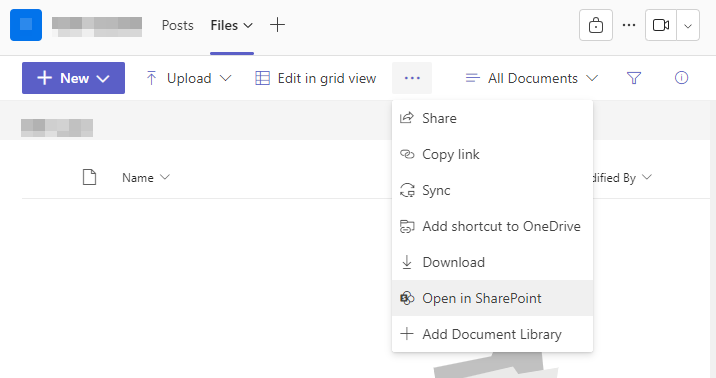
  <li>Open the Channel you are interested in, and go to the <code class="language-plaintext highlighter-rouge">Files</code> tab</li>
  <li>Click on the ellipsis and choose <code class="language-plaintext highlighter-rouge">Open in SharePoint</code></li>
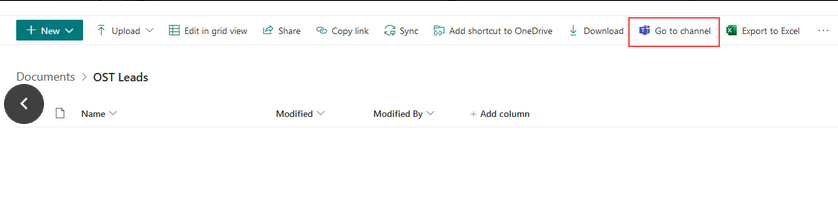
  <li>In the web page that opens, click on <code class="language-plaintext highlighter-rouge">Go to Channel</code></li>
  <li>Now, when prompted open the link using MS Teams (and optionally set is as the default behavior)</li>
  <li>Create a shortcut for this URL (or) bookmark it in browser for easier access to it later on</li>
</ol>

<p><img src="https://i.postimg.cc/65M4xBNM/image.png" alt="Open in SharePoint" title="Open in SharePoint" /></p>

<p><img src="https://i.postimg.cc/mrzmFdwG/image.png" alt="Go to Channel" title="Go to Channel" /></p>

<p>While this is not the cleanest solution, it does seem to help a little bit. Again, this mainly works because I collaborate mainly on 2-3 Channels on a regular basis. If you do collaborate on multiple Channels, this could become cumbersome (but still better than switching back and forth between Chat and Teams screens!).</p>

<p>Do you face similar problems with Teams? How are you tackling it?</p>]]></content><author><name>jjk_charles</name></author><category term="tips" /><category term="msteams" /><category term="ms-teams-channels" /><summary type="html"><![CDATA[Majority of our Working hours are spent staring at communication software like Teams, Slack, etc. (this is true at least for us IT Folks since the pandemic) When they have become an integral part of our daily working life, it is important that they provide the best possible experience to not help improve collaboration rather than hinder it.]]></summary></entry><entry><title type="html">VSCode REST Client</title><link href="http://blog.jjkcharles.com/explorations/2023/10/01/explore-vscode-rest-client.html" rel="alternate" type="text/html" title="VSCode REST Client" /><published>2023-10-01T00:00:00+00:00</published><updated>2023-10-01T00:00:00+00:00</updated><id>http://blog.jjkcharles.com/explorations/2023/10/01/explore-vscode-rest-client</id><content type="html" xml:base="http://blog.jjkcharles.com/explorations/2023/10/01/explore-vscode-rest-client.html"><![CDATA[<p>Due to the popularity of <a href="https://www.postman.com/">Postman</a> and it having been very accessible through browser extenstion (<a href="https://blog.postman.com/goodbye-postman-chrome-app/">in the past</a>), it has become the defacto standard API client within my organization. While I can’t change the choice of API tools used within my teams, as they largely rely on workflows relating to passing around collections etc. I have been for a long time wanting to try out other tools to see if there are better alternatives out there.</p>

<p>I have in the past tried multiple tools some which are below,</p>
<ul>
  <li><a href="https://insomnia.rest/">Insomnia</a></li>
  <li><a href="https://www.thunderclient.com/">Thunder Client</a></li>
  <li><a href="https://nightingale.rest/">Nightingale</a></li>
</ul>

<p>One common thing about it all is the user interface remains somewhat similar to one another - you have collections, requests, tabs to shuffle across APIs, variables for customizing dataflow. After trying them out, none of them gave me a feeling of wanting to switch over to them.</p>

<p>And, to be clear I am purely interested in capabilities that allow accessing APIs alone and I don’t heavily rely on Postman for API Testing, API Documentation (for this, I use <a href="https://swagger.io/tools/swaggerhub/">SwaggerHub</a>), Mocking etc.</p>

<h2 id="the-problem">The Problem</h2>
<p>One of the gripe I have over Postman and others I have tried out over the years, is the need to constantly switch tabs and enter data across multiple places when I want to trigger requests to multiple endpoint under the same/similar context.</p>

<p>Imagine you have multiple endpoints that share different level of details about your online order, and all of them take order number as the input, with some of them taking additional input parameters on top of order number. The way most tools handle inputs is through request-specific variables (or) through collection/environment variables. While setting a collection/environment variable does achieve setting the variable once and having it cascaded across different requests it is still an hassle to switch back and forth between tabs anytime data needs to be modified.</p>

<h2 id="rest-client">REST Client</h2>

<p>Recently I came across <a href="https://github.com/Huachao/vscode-restclient">REST Client</a> (which is actually an <a href="https://marketplace.visualstudio.com/items?itemName=humao.rest-client">extension for VSCode</a>)</p>

<h3 id="installation">Installation</h3>
<p>Assuming you already have VSCode, to install the extension search for <code class="language-plaintext highlighter-rouge">humao.rest-client</code> in VSCode.</p>

<h3 id="features">Features</h3>
<p>REST Client offers ability to access REST APIs, gRPC and GraphQL based APIs. Below are few of the core capabilities,</p>

<ul>
  <li>Run Http requests and visualize results in a different pane</li>
  <li>Save response to disk</li>
  <li>Access history for API Requests made &amp; use them to initiate a Request</li>
  <li>Fold/Unfold API Response that is in JSON or XML format</li>
  <li>Environments &amp; Variables support</li>
</ul>

<h3 id="standout-capabilities">Standout Capabilities</h3>
<p>Below are few capabilities, that stood out to me,</p>
<h4 id="1-single-text-file-that-can-contain-all-your-api-definition">1. Single text file that can contain all your API definition</h4>
<p>The text file where you put in all your Requests can follow <a href="https://www.w3.org/Protocols/rfc2616/rfc2616-sec5.html">HTTP standards</a>, with each individual Requests separated our by <code class="language-plaintext highlighter-rouge">###</code> in their own line. This is a great alternative to having N number of tabs depending on the number of endpoints you are dealing with.</p>
<h4 id="2-support-for-file-scoped-variable">2. Support for file-scoped variable</h4>
<p>This is another benfit to having all the Requests defined in a single file. Where any <a href="https://github.com/Huachao/vscode-restclient#file-variables">variables defined with a File-scope</a> will be available for use across all the Requests. For instance, going by the example mentioned above - if you have 5 endpoints all requiring order number as input, you could define the order number variable once and refer it in all the requests; invoking the endpoints for a different order number is as simple as updating one single variable which propagates it across all the endpoints.</p>
<h4 id="3-split-pane-view-for-api-definitions-and-viewing-results-this-allows-you-to-work-on-multiple-api-endpoints-without-switching-tabsscreens">3. Split-pane view for api-definitions and viewing results. This allows you to work on multiple API endpoints without switching tabs/screens</h4>
<p>Results of the current Request show in a split-editor view, so there is no toggling between windows/tabs even for accessing the response headers. Also, the status bar shows useful information like breakdown of time taken &amp; breakdown of response size.</p>
<h4 id="4-support-for-accessing-jsonxml-responseheaders-for-other-api-requests-that-you-have-already-made">4. Support for accessing JSON/XML response/headers for other API requests that you have already made</h4>
<p>This is one of the great things where, lets say you have two interlinked API endpoints, where you need to pull data points from one’s Response and feed it into the Request of another. There is no need to copy/paste those across Reqests OR setup “test scripts” to copy response values into a Environment/Collection variable for accessing it outside the Request context.</p>

<p>Take below example, if one of the endpoints returns all objects and in a different endpoint you want to pass in the “id” of first item returned to get more details, you can have it setup as below,</p>

<div class="language-http highlighter-rouge"><div class="highlight"><pre class="highlight"><code><span class="err"># File Variables #
@baseUrl = api.restful-api.dev

###

# List of objects by ids
// @name allObjects
GET https://{{baseUrl}}/objects
    ?id=ff8081818ad150c5018ade970fab1017
    &amp;id=13

# Single object
GET https://{{baseUrl}}/objects
    ?id={{allObjects.response.body.$[0].id}}
</span></code></pre></div></div>

<blockquote>
  <p>Notice the usage of <code class="language-plaintext highlighter-rouge">// @name allObjects</code> which assigns a name to that Request, and <em>once it is run</em>, the response (including headers) can be accessed in a different Request within the same file. It is referenced in another Request with the syntax - <code class="language-plaintext highlighter-rouge">{{allObjects.response.body.$[0].id}}</code></p>
</blockquote>

<h4 id="5-support-for-prompting-user-input-when-running-a-request">5. Support for prompting user input when running a Request</h4>
<p>Rather than provide all the inputs upfront, if you want to prompt user to key-in data at the time of triggering the request, that is possible too. You do it as below,</p>

<div class="language-http highlighter-rouge"><div class="highlight"><pre class="highlight"><code><span class="err"># File Variables #
@baseUrl = api.restful-api.dev

###

# Single object
// @prompt Id Enter the ID value you want to retrieve details for:
GET https://{{baseUrl}}/objects
    ?id={{Id}}

###
</span></code></pre></div></div>

<h2 id="what-next">What next?</h2>
<p>With a new kind of user experience, this extension definitely does feel like a breath a fresh air, in a space crowded with multiple tools offering kind of very similar experience. Overall, this is a well rounded offering and covers majority of features anyone would expect to get out of an API client. Like I mentioned earlier, this isn’t going to become a replacement for Postman especially at Work, as it would then entail changes to  workflows my teams are already adopting to.</p>

<p>But, I am going to start using it for non-trivial API specs I have been maintaining for my personal hobby projects.</p>

<p>After getting a feel of what this extension offers, I was looking to see if there are similar kind of approaches used by other such tools. And, I indeed stumbled upon one - which is probably little newer that REST Client, and thus may be not as popular as this one.</p>

<p><a href="https://httpyac.github.io/">httpYac</a> is the one I found. This though is very similar to REST Client in lots of ways, from the looks of it, it does seem way more feature-rich than REST Client. With pretty good additions like plugin system, Scripting support (Javascript) and the ability for it to be plugged into CI/CD pipelines.</p>

<p>Pretty eager to give this a try sometime soon!</p>]]></content><author><name>jjk_charles</name></author><category term="explorations" /><category term="api" /><category term="vscode-plugins" /><category term="REST" /><summary type="html"><![CDATA[Due to the popularity of Postman and it having been very accessible through browser extenstion (in the past), it has become the defacto standard API client within my organization. While I can’t change the choice of API tools used within my teams, as they largely rely on workflows relating to passing around collections etc. I have been for a long time wanting to try out other tools to see if there are better alternatives out there.]]></summary></entry></feed>